

testsprite ci run runs a project’s tests, waits for the verdict, and exits non-zero if any test does not pass. testsprite ci init github writes a GitHub Actions workflow that runs it against each pull request’s preview.
Set up the pull-request gate
1
Add your API key as a repository secret
Mint the key in the workspace the project belongs to. It is tied to the member who minted it and stops working if they leave or are removed from the workspace, so mint it from an account that will stay. Save it as the 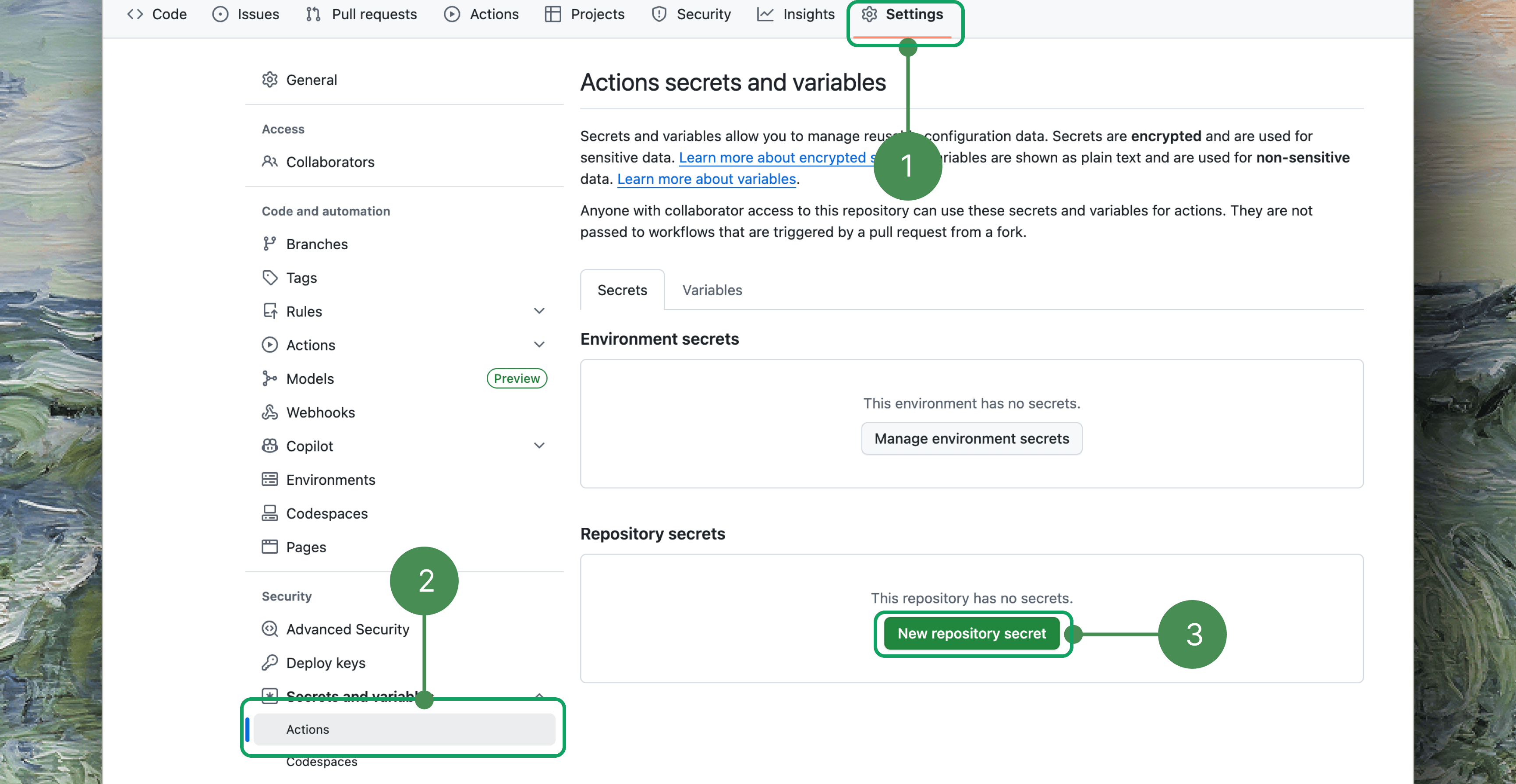
TESTSPRITE_API_KEY secret under Settings → Secrets and variables → Actions, or pass --set-secret in the next step to set it through gh.2
Generate the workflow
.github/workflows/testsprite.yml. --env is the environment whose sign-in every pull-request run uses; an unknown name is refused. --project can be left out when the workspace has only one project, and --dry-run prints the file without writing it. The workflow skips fork and draft pull requests and fails if a selected test never ran.3
Tell it where the preview is
The file has one placeholder step, marked
REPLACE ME. Replace it to match how your pull requests get a public preview:- Your platform deploys every pull request (Vercel or Netlify): change the trigger to
on: deployment_statusand delete the placeholder. - Your workflow deploys: keep
on: pull_request, put your deploy commands in the placeholder, and end it withecho "url=<preview address>" >> "$GITHUB_OUTPUT".
- A — platform deploys every PR
- B — the workflow deploys (Vercel CLI shown)
4
Open a pull request
Commit the workflow, open a pull request that isn’t a draft, and watch the
TestSprite / testsprite-tests check. To block merges on it, require testsprite-tests in branch protection.Nothing ran on my pull request
Nothing ran on my pull request
- A draft pull request is skipped: the job prints
Skipping draft pull requestand passes. - A pull request with merge conflicts never starts
pull_requestworkflows, and GitHub shows no error. - If none of the repository’s workflows run, Actions is disabled, which is common on forks.
- With
deployment_status, check that a successful deployment event arrived for the commit.
One repository deploys several projects
One repository deploys several projects
The platform sends one deployment event per project for the same commit (
Preview – <project> on Vercel). Add && github.event.deployment.environment == 'Preview – <project>' to the job’s if: to gate on one of them.What you get
- A check on the pull request. It fails when a test fails or is blocked (exit
1), or when the run takes longer than--timeout(exit7, default 600 seconds). Cancelling the job doesn’t stop the TestSprite run it started; that run still finishes in the Portal. - The execution report as the job summary: the same content the GitHub App posts as a pull-request comment, plus an annotation for each test that didn’t pass. Anyone who can read the repository can read it.
testsprite-summary.json, uploaded as thetestsprite-resultsartifact.- One run in the Portal, linked to the pull request. It runs in a temporary copy of the
--envenvironment pointed at the preview, namedgithub-pr-<N>, which is removed when the run ends. That environment must sign in with a username and password, or not at all; a recorded (SSO) session is refused before anything is charged.
Coding Agent Integration
Let your agent drive the verification loop
Exit Codes
Every exit code and what to do about it