

Prerequisites
Before installing, make sure you have:- Node.js 20.19+, 22.13+, or 24+ (the odd-numbered releases 21.x and 23.x are not supported)
- A TestSprite account — Sign up for free
- A TestSprite API key (created below)
Check your version with
node --version; the CLI exits with a clear message at startup if Node is too old. Get a newer release from nodejs.org .Install
Install the CLI globally with npm:npx @testsprite/testsprite-cli --version. Verify the installation:
Get Your API Key
- Sign in to your TestSprite dashboard .
- Switch to the workspace the CLI should work in, then open Workspace Settings → Connections → API Keys and click New API Key.
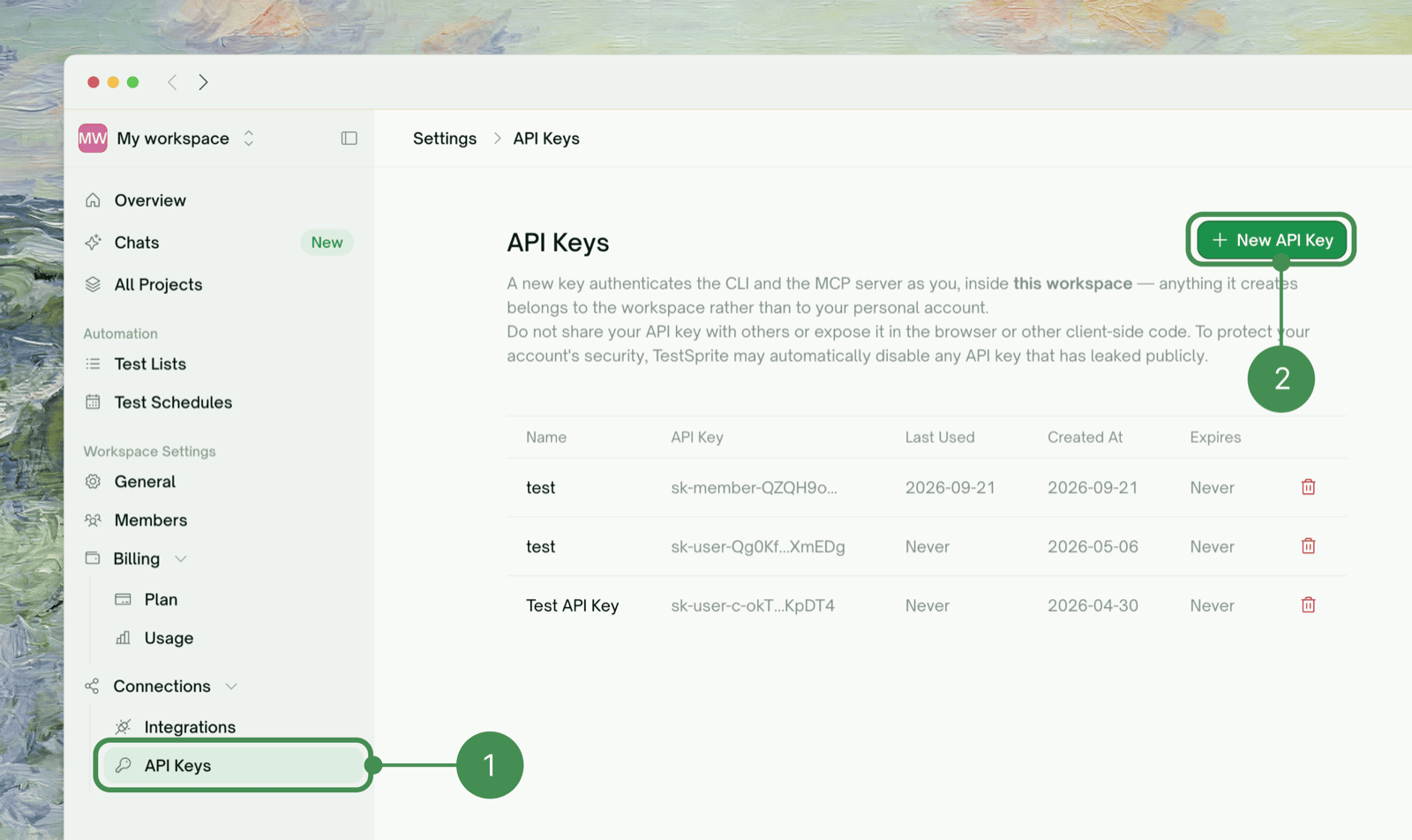
- Copy the key — it is shown once only. If you lose it, revoke it and create a new one. You can hold 2 active keys per workspace, so revoke one first if you are at the limit. The key acts in that workspace only. See API Keys.

read:projects, read:tests, read:me, write:tests, run:tests, write:projects, read:schedules, write:schedules and run:tunnel while you are a Member, Admin, or Owner of the workspace; a Viewer can’t hold a key. Check it with testsprite auth status.
Sign In
setup prompts for your API key, verifies it, and installs the agent skills into your project. Replace AGENT with claude, cursor, cline, windsurf, antigravity, kiro, copilot or codex; it takes a single target. Without --agent, it installs for every agent it detects in the project, or claude if none. To install for several explicitly, run testsprite agent install cursor codex. Run it once per project.
To configure credentials only, use testsprite setup --no-agent.
Verify
org: line is the workspace the key acts in. It adds a note when write:tests or run:tests is missing. Run testsprite doctor to diagnose missing run:tunnel access.
Using It in CI
SetTESTSPRITE_API_KEY as a secret and run setup non-interactively:
--from-env reads the key from the environment, and --yes accepts all defaults. The CLI never accepts the key as a positional argument or writes it to logs.
CI/CD Integration
Pipeline examples and exit code handling
Where to Go Next
Quickstart
Create a test, run it, and read the failure bundle end to end
Authentication
Profiles, env vars, scope errors, and rotating keys
Key Terms
Projects, tests, runs, and the object model
CI/CD Integration
Pipeline examples and non-interactive setup